
What Is Microsoft Clarity and How Does It Work With AI?
⚡ TL;DR — For Our Clients (Start Here)
We installed Microsoft Clarity on your website this week — it's free and already running
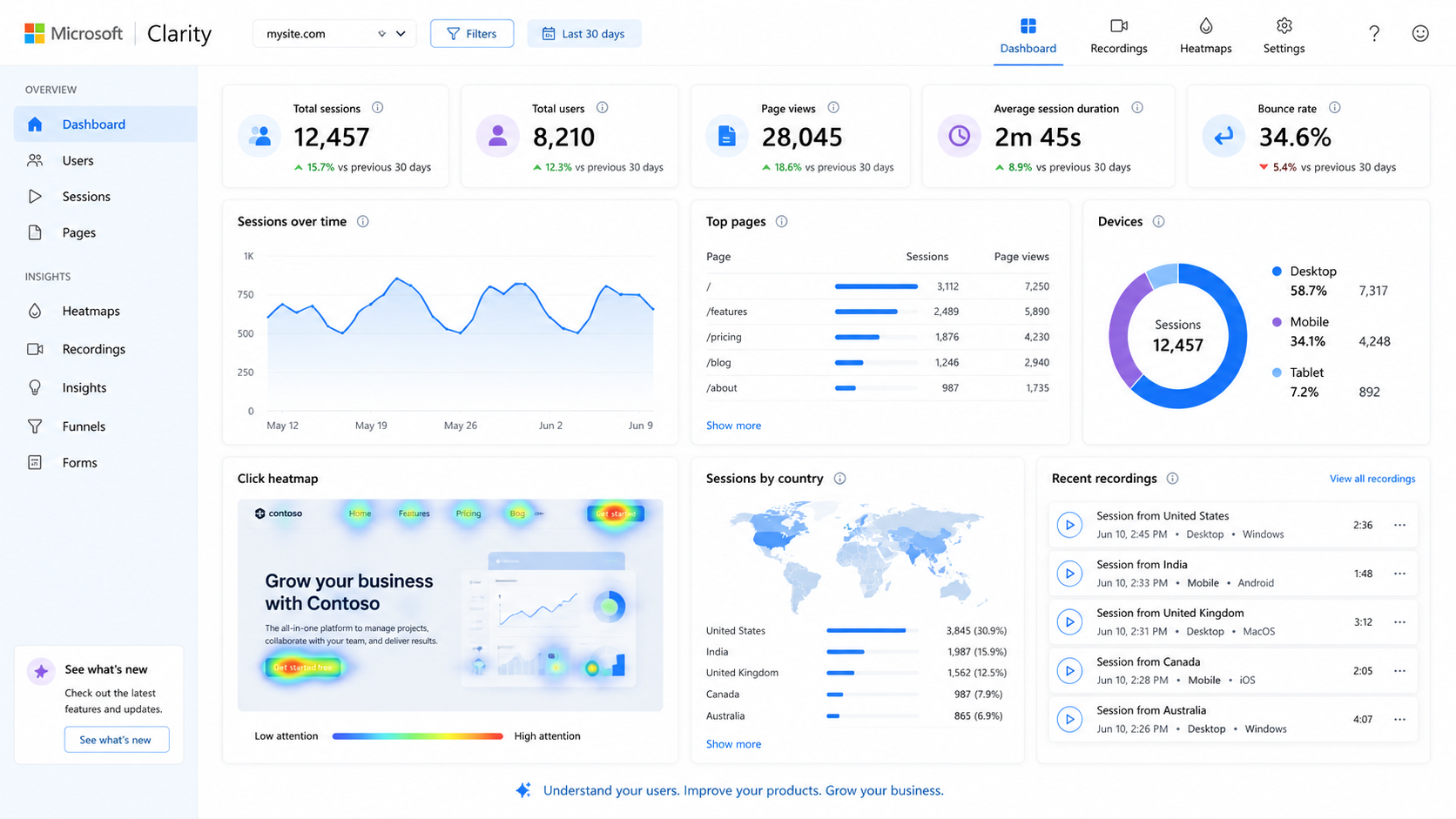
Clarity shows us session recordings, heatmaps, rage clicks, and scroll depth — the game film behind your Google Analytics scoreboard
We connected it to our AI workflow so every optimization decision is now backed by real visitor behavior data
If you already had Clarity installed — approve the admin request from RightNow Communications when it arrives
First behavioral data report hits in 30 days. No extra cost. Already included.
We Made a Move This Week — Here's What Happened
We don't wait for quarterly reviews to make improvements. When we find something that makes your marketing smarter, we move on it fast.
This week we installed Microsoft Clarity across all RightNow client websites — and if you already had it running, you'll be seeing a request to add us as an admin. More on that below.
Here's exactly what we did, why we did it, and how it's going to change the way we work for you.
What Is Microsoft Clarity?
Clarity is a free behavioral analytics tool from Microsoft that shows us exactly how real visitors interact with your website — not just that they visited, but what they actually did while they were there.
Think of Google Analytics as the scoreboard. Clarity is the game film.
It captures:
Session recordings — real video replays of how visitors move through your site
Heatmaps — where people click, scroll, and stop reading
Rage clicks — where visitors are repeatedly clicking something that isn't working
Dead clicks — buttons and links people click that go nowhere
Scroll depth — how far down your pages people actually read
This is data we've never had at this level before — and it changes everything about how we optimize your site.
Why We Added It to Every Account
Because guessing is expensive.
Most website decisions get made on instinct — move this button, change that headline, rewrite this section. Without behavioral data that's all they are: guesses.
With Clarity we can now see:
Which pages are confusing visitors
Where people drop off before converting
What's getting ignored that you think people are seeing
What's getting clicked that you didn't expect
No more guessing. Every optimization decision from here on out is backed by actual human behavior data from your actual visitors.
How Does Microsoft Clarity Work With AI?
Here's where it gets interesting.
Clarity connects directly to our AI workflow. Using the Clarity MCP integration with Claude, we can now query your behavioral data conversationally — asking things like:
"What are the top rage click patterns on the homepage this month?"
"Where are mobile visitors dropping off on the contact page?"
"Which pages have the highest scroll depth and what do they have in common?"
Then we layer that behavioral insight on top of your GA4 conversion data to build a complete picture of what's working, what's broken, and exactly what to fix first.
This is the kind of CRO analysis that used to cost thousands per month. It's now built into your RightNow engagement at no additional cost.
If You Already Had Clarity Installed
Some of you were already running Clarity — great minds think alike.
You'll be receiving a request to add RightNow Communications as an admin on your Clarity account. Please approve that request so we can connect your data to our reporting and AI workflow.
If you have any questions about the request or aren't sure how to approve it, just reply to this email and we'll walk you through it in two minutes.
What Happens Next
Clarity needs 30-60 days of data before patterns become meaningful. We've already started the clock.
Here's what you can expect:
30 days — first behavioral data review included in your monthly report
60 days — full heatmap and session recording analysis
90 days — first AI-powered CRO recommendations based on real visitor behavior
More upgrades coming this quarter. Same flat rate. No surprises.
FAQ — For Everyone Else
Q: What is Microsoft Clarity and how does it work with AI?
Microsoft Clarity is a free website behavior analytics tool that records how real visitors interact with a site. It captures session recordings, heatmaps, click patterns, scroll depth, and frustration signals like rage clicks and dead clicks — giving marketers a visual layer of data that traditional analytics tools like Google Analytics don't provide. Clarity also integrates with AI tools through its built-in Copilot assistant and MCP (Model Context Protocol) support, allowing platforms like Claude to query behavioral data directly and generate actionable CRO recommendations.
Q: Is Microsoft Clarity really free?
Yes. 100% free with no session limits, no data caps, and no premium tier. Microsoft funds it as part of its broader analytics and AI ecosystem. There is no catch.
Q: How is Clarity different from Google Analytics?
Google Analytics tells you what happened — how many sessions, bounce rate, conversions. Clarity shows you why it happened — where people got confused, what they ignored, where they dropped off. Together they give you the full picture.
Q: What is a rage click?
A rage click is when a visitor rapidly clicks the same element multiple times out of frustration — usually because something isn't working as expected, a button isn't responding, or they expect something to be clickable that isn't. Rage clicks are one of the clearest signals of a broken user experience.
Q: What is a heatmap?
A heatmap is a visual overlay on your webpage that shows where visitors click, move their mouse, and scroll. Hot zones (red/orange) show high activity areas. Cold zones (blue) show areas being ignored. Heatmaps make it instantly clear whether your most important content and CTAs are actually being seen.
Q: How does Clarity work with AI?
Microsoft Clarity has a built-in Copilot AI assistant that summarizes session data and answers questions about visitor behavior. It also supports MCP (Model Context Protocol) integration — which allows external AI tools like Claude to query Clarity data directly. At RightNow we use this to generate behavioral insights and CRO recommendations as part of our monthly client reporting workflow.
Q: What is CRO and why does it matter?
CRO stands for Conversion Rate Optimization — the practice of improving your website so more visitors take the action you want (call, form fill, purchase, signup). Most businesses focus exclusively on driving more traffic. CRO focuses on making the traffic you already have work harder. A 1% improvement in conversion rate is often worth more than doubling your ad budget.
Q: Does Clarity affect website speed?
Minimally. The Clarity script is lightweight and loads asynchronously — meaning it doesn't block your page from loading. Microsoft has optimized it specifically to have near-zero impact on Core Web Vitals and page speed scores.
Q: Is Clarity GDPR and CCPA compliant?
Yes. Clarity includes built-in masking settings (Balanced and Strict modes) that automatically redact sensitive user data from session recordings. It is compliant with GDPR, CCPA, and other major privacy regulations. For healthcare, legal, or financial clients we apply Strict masking by default.
Q: How long does it take to see data in Clarity?
Data starts appearing within hours of installation. However meaningful patterns — reliable heatmaps, recurring rage click signals, scroll depth trends — typically require 30-60 days of accumulated sessions depending on your traffic volume.
Q: Can I install Clarity myself?
Yes. If you have access to Google Tag Manager, installation takes under 10 minutes. Create a free account at clarity.microsoft.com, grab your Project ID, add a new tag in GTM using the Microsoft Clarity template, set the trigger to All Pages, and publish. If you don't have GTM, the script can be added directly to your site's header code.
Q: I already had Clarity installed — what do I need to do?
If you're a RightNow Communications client and already had Clarity running, you'll receive an admin access request from our team. Approving it gives us visibility into your behavioral data so we can connect it to our AI reporting workflow. It takes one click and doesn't change anything about how your Clarity account works.